
Browse all guides
Recording questions
Why Does My Apple Watch Stop Recording?
On this page
Calls, alarms and timers can stop an Apple Watch recording.
Pastok sends an alert when recording is interrupted, so you know to start it again. To receive the alert, turn on Pastok notifications and allow Pastok in any Focus you use.
Check notification and Focus settingsWhat actually takes the microphone
One app holds the microphone at a time. When the system needs it for something it considers more urgent, it takes it, and your recording ends where it stood. A 90-minute session doesn't fail all at once — it ends at minute 34 and the file looks normal until you play it.
| What happens | Recording |
|---|---|
| Incoming call | Stops |
| Alarm | Stops |
| Timer going off | Stops |
| Battery empty | Stops, and that is a separate ceiling |
| Screen off | Depends on the app, not the system |
Calls get blamed for this because calls are what people notice. Alarms and timers do the same thing and get noticed less, because you dismiss the alarm, put your wrist down, and carry on talking. Apple documents the general audio-interruption mechanism for developers, but its Voice Memos help page for Apple Watch doesn't warn users that a take can end this way. That gap is why it keeps catching people who thought they only had to worry about the phone ringing.
If you record at a predictable time of day, this is the one to check first. A standing alarm that fires every Tuesday at 10 will cut every Tuesday session at the same point, and it will look like the app failing rather than the alarm working.
Why "just turn on Do Not Disturb" doesn't fix it
Do Not Disturb is the standard advice for this, and it fails twice.
It's incomplete. Emergency contacts are passed through Do Not Disturb by design, so the calls still capable of reaching you are exactly the ones you'd least want to ignore — and when one lands, it takes the microphone like any other call. You've narrowed the odds without closing the hole.
It's also the wrong trade. What you wanted was to keep talking without answering the phone; what Do Not Disturb gives you is not knowing the phone rang. Those aren't the same thing, and you generally find out which one you bought at the worst moment.
There's a deeper problem with prevention as a goal. Even if you silenced every possible interruption, you'd still be trusting that nothing went wrong for the next ninety minutes. The useful question isn't how do I stop this. It's how long does the silence last before I know about it.
Being told, while you're still in the room
Pastok doesn't try to keep the current take running through the interruption. What it does is refuse to let the interruption pass unnoticed.
When a session is interrupted, Pastok sends a notification asking you to resume. The point is that you find out while you're still in the room, rather than three days later when you go looking for a recording that stops in the middle. Related content from the restarted session can land in one summary.
Be clear about what this isn't. The session does not continue underneath the call, and Pastok does not auto-resume afterward. The gap where the interruption happened is permanent — that audio was never captured and no notification brings it back. What you get back is the rest of the conversation, and the knowledge that you need to start it again.
Voice Memos gives you none of that. The take ends, nothing tells you, and there's no resuming it — whatever you start afterwards is a separate file. One conversation becomes two unrelated stubs, and you get to find them and line them up yourself.
Pastok also sends a notification when the time you usually record passes and nothing is running. If your Tuesday mornings normally start with a session and this Tuesday doesn't, that's worth a tap on the wrist. It's the earlier version of the same failure: not a recording that got cut, but one that never began.
Two constraints on that one. It doesn't start recording for you — Pastok never begins capture on its own, and this is a nudge, not a trigger. And it reads your own past pattern rather than following a rule, so treat it as a helpful prompt and not a guarantee that every missed session gets flagged.
The two settings that decide whether you ever see these
This is the part that gets left out, and leaving it out is worse than saying nothing. A notification you never receive doesn't read as a problem — it reads as everything being fine.
1. Notifications have to be allowed. If you declined the permission prompt, there is nothing to deliver. Neither notification exists for you until that's on.
2. If you use a Focus, Pastok has to be on that Focus's allowed list. The path is Settings → Focus → the Focus you actually run → Apps. Faster: pull down on the Home Screen and type "focus" into search, which drops you straight into the Focus settings without scrolling the Settings list.
Each Focus keeps its own separate list, so setting one up does nothing for the others. Do it for the Focus you actually have running during meetings, because that's the only one that matters here.
On the Focus screen, tap Apps under Allow Notifications. Make sure the mode at the top is Allow Notifications From rather than Silence Notifications From, because the two invert what the list means — under Silence, adding Pastok is how you block it. Then tap Add Apps and pick Pastok.
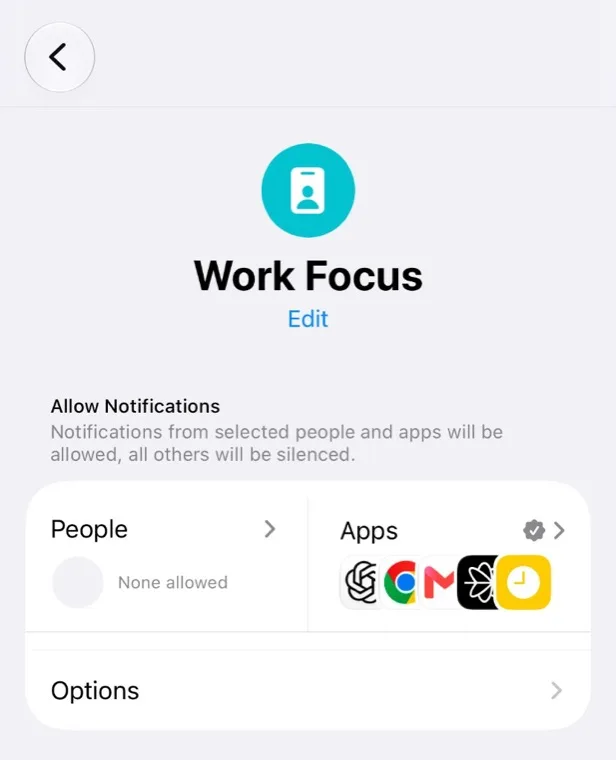
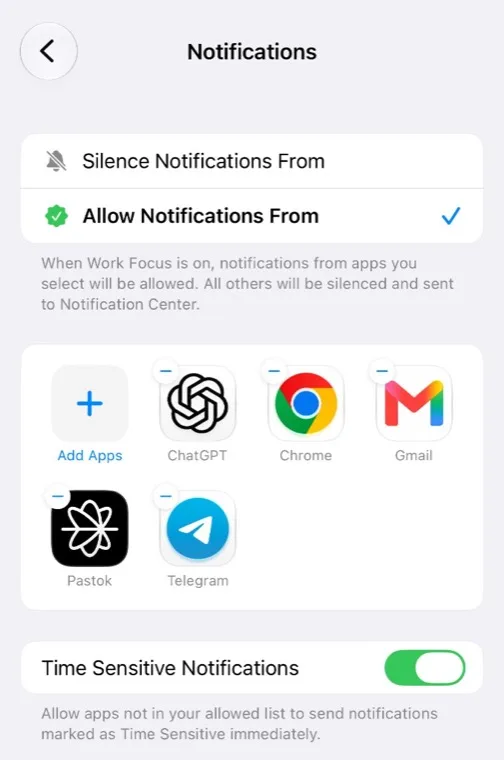
One thing not to rely on: the Time Sensitive Notifications switch at the bottom of that screen is a blanket exception for notifications an app itself has flagged as urgent. Leaving it on is not a substitute for adding Pastok to the list. If you only do one of the two, do the list.
This second setting is the trap, and it's worth being blunt about why. The people most likely to have a Focus running are in a meeting, in a lecture, or in deep work — exactly the people the resume notification exists for. Focus doesn't tell you what it suppressed. So the failure looks like this: recording dies, notification is written, Focus holds it, you notice nothing, and you find the truncated session next week.
Do it once, before you need it. It takes about fifteen seconds and it's the difference between the feature working and the feature being theoretical. While you're in there, put the app on your Watch face too, so restarting after a call is one tap rather than a hunt through the app list.
One more honest note: watch notification delivery can lag. Treat these as "you'll find out soon," not "you'll find out the instant it happens."
What this doesn't solve
Battery is a separate ceiling and this page doesn't move it. If what you're picturing is all-day capture, charge will stop you long before an alarm does, and no notification setting changes that. Charge, not interruption, is what ends a genuinely long session — that's covered in how long an Apple Watch can record.
A broken microphone is a different problem with a different fix, and no notification setting helps. If recording fails immediately and consistently rather than mid-session, that's hardware or a permission, not this.
And none of this is a method for recording people who don't know. If that's the job, stop.
FAQ
An incoming call can interrupt the active audio session on Apple Watch and iPhone. Pastok ends the current take when that happens; it does not keep recording underneath the call. Pastok then sends a notification asking you to restart, subject to the two settings above.
They do, and it surprises people more than calls do, because you dismiss an alarm in a second and carry on talking. It still behaves this way on a Series 10 running watchOS 11, and Apple doesn't document it. If you record at a predictable time of day, check your standing alarms before you blame the app.
Apps can influence some interruption and recovery behavior, but they cannot recover audio that was never captured while another system service had control of the microphone. Pastok's current behavior is to end the take, alert you, and let you restart manually. The practical differences are how quickly you're told and whether the restarted session can be grouped with what came before.
It improves your odds and it's the workaround people recommend, but it leaves two holes. Emergency contacts pass through Do Not Disturb, and when one of those calls arrives the microphone goes with it. You've also given up knowing that someone tried to reach you, which is usually the thing you wanted least to trade.
Two likely reasons. Notification permission is off, or a Focus is running and Pastok isn't on its allowed list — Settings → Focus → the Focus → Apps, or search "focus" from the Home Screen to get there directly. The second is easy to miss because Focus doesn't report what it held back, and because each Focus has its own separate list.
Not in Pastok today. Pastok asks you to restart the recording manually after the interruption ends. The stretch during the call or alarm was never captured and stays missing. What the prompt saves you is the hour that would have come after it.
Related
Set this up before you need it
Two things, once. Allow notifications, and add Pastok to the allowed apps of any Focus you run. The interruption will still happen. You'll just know about it before the conversation is over.
Try Pastok